
laptop suggestions
Re: laptop suggestions
 by Andrew on Fri Sep 10, 2010 10:58 am

Contact: Email | X | Bluesky
Modding Topics: NBA 2K10 | NBA Live 08 | NBA Live 07 | NBA Live 06 | NBA 2K6 | NBA Live 2005 | NBA Live 2004 | NBA Live 96
Story Topics: NBA Live 16 | NBA 2K14 | NBA 2K13 | NBA Live 06 (Part 2) | NBA Live 06 (HOF) | NBA Live 2004 (HOF)
NLSC: Podcast | The Friday Five | Monday Tip-Off | Wayback Wednesday | Facebook | X | YouTube | Instagram | Bluesky
Donations/Support: Patreon | PayPal
-

Andrew - Retro Basketball Gamer

- Posts: 115428
- Joined: Thu Aug 22, 2002 8:51 pm
- Location: Australia
Re: laptop suggestions
by cyanide on Fri Sep 10, 2010 11:16 am
The way it stands, it appears very easy to make a virus for Windows and extremely difficult to make one for OS X.
......|..___________________, ,
....../ `---______----|]
...../==o;;;;;;;;______.:/
.....), ---.(_(__) /
....// (..) ), ----"
...//___//
..//___//
.//___//
WE TRUE HOMIES
WE RIDE TOGETHER
WE DIE TOGETHER
-

cyanide - Dat steatopygous
- Posts: 9197
- Joined: Sat Oct 11, 2003 6:09 am
- Location: US's toque
Re: laptop suggestions
by benji on Fri Sep 10, 2010 11:21 am
cyanide wrote:OS X isn't immune, but it's nice to not have any spyware, malware, or antivirus programs running/updating and still surf the web with reckless abandon.
Strange I do that in Vista and haven't had any problems in like a decade (Windows 98) hmmm...
And Linux is still the cheapest and most secure.
Just go back to talking about your emotions and feelings when touting a Mac, it's the only thing that can sell them.
cyanide wrote:The way it stands, it appears very easy to make a virus for Windows and extremely difficult to make one for OS X.
Based on the difference in all software production it appears very easy to make ANYTHING for Windows and more difficult to do so for Macs.
This whole virus argument is so stupid. Stop arguing about something that stopped being relevant five years ago.
-

benji - Posts: 14545
- Joined: Sat Nov 16, 2002 9:09 am
Re: laptop suggestions
by Andrew on Fri Sep 10, 2010 11:25 am
cyanide wrote:Ok, I'll be generous. Instead of 70 000 viruses, why aren't there 3 viruses causing widespread damage and distress? There's a lot of good developers out there, but one has yet to create a malicious counterpart that exists in Windows. Would it be fair to say that OS X's Unix foundation is a significant factor in the security of the operating system?
Absolutely. benji already mentioned that in fact and I never disputed it. Going back to my original point, I was merely disputing that there are no viruses that affect Macs and that the claim some people make that Macs are immune isn't entirely accurate. That's all. The market share has to be somewhat of a factor but yes indeed, the operating system is a significant factor without a doubt.
Contact: Email | X | Bluesky
Modding Topics: NBA 2K10 | NBA Live 08 | NBA Live 07 | NBA Live 06 | NBA 2K6 | NBA Live 2005 | NBA Live 2004 | NBA Live 96
Story Topics: NBA Live 16 | NBA 2K14 | NBA 2K13 | NBA Live 06 (Part 2) | NBA Live 06 (HOF) | NBA Live 2004 (HOF)
NLSC: Podcast | The Friday Five | Monday Tip-Off | Wayback Wednesday | Facebook | X | YouTube | Instagram | Bluesky
Donations/Support: Patreon | PayPal
-
Andrew - Retro Basketball Gamer
- Posts: 115428
- Joined: Thu Aug 22, 2002 8:51 pm
- Location: Australia
Re: laptop suggestions
by shadowgrin on Fri Sep 10, 2010 11:34 am
This.benji wrote:Based on the difference in all software production it appears very easy to make ANYTHING for Windows and more difficult to do so for Macs.cyanide wrote:The way it stands, it appears very easy to make a virus for Windows and extremely difficult to make one for OS X.
But wait! There's more...
Are the software that run in Windows superior benji? Are they free? I think not!cyanide wrote:You mean superior software, many of which are free?
- shadowgrin
- Doesn't negotiate with terrorists. NLSC's Jefferson Davis. The Questioneer
- Posts: 23229
- Joined: Thu Dec 12, 2002 6:21 am
- Location: In your mind
Re: laptop suggestions
by benji on Fri Sep 10, 2010 11:44 am
Microsoft faces a disadvantage to Apple in packaging software because there's these things called governments who threw a fit when Microsoft dared to package in a web browser.
Besides, Windows costs like $150-200. All that "free" Apple software will cost you $2000+ if you acquire it as you are supposed to.
-
benji - Posts: 14545
- Joined: Sat Nov 16, 2002 9:09 am
Re: laptop suggestions
by cyanide on Fri Sep 10, 2010 12:51 pm
benji wrote:Strange I do that in Vista and haven't had any problems in like a decade (Windows 98) hmmm...
It's not my fault you have no interest in surfing porn

benji wrote:Just go back to talking about your emotions and feelings when touting a Mac, it's the only thing that can sell them.
Look at that subtle off-white coloring. The tasteful thickness of it. Oh my God, it even has a watermark!
I don't know how much Windows software improved in terms of UX and UI design that developers put into their 3rd party apps the last few years, but comparing the productivity tools I have to use at work vs. at home, it's a joy to use on OS X.
Edit: Give me a list of the best ftp client, pdf reader, bittorrent client, text editor and whatever else, and I'll compare it with the OS X counterparts.
......|..___________________, ,
....../ `---______----|]
...../==o;;;;;;;;______.:/
.....), ---.(_(__) /
....// (..) ), ----"
...//___//
..//___//
.//___//
WE TRUE HOMIES
WE RIDE TOGETHER
WE DIE TOGETHER
-
cyanide - Dat steatopygous
- Posts: 9197
- Joined: Sat Oct 11, 2003 6:09 am
- Location: US's toque
Re: laptop suggestions
by benji on Fri Sep 10, 2010 12:58 pm
If you're getting viruses from porn or really any sites you're probably looking at some pretty shady websites.
Then again, you did list some of your fetishes in another thread.
Edit: Give me a list of the best ftp client, pdf reader, bittorrent client, text editor and whatever else, and I'll compare it with the OS X counterparts.
Except you can't define the "best" as that's independent for each user, and you're completely ignoring cross-platform software. Here's what I "use" for those:
FileZilla
uTorrent
FoxIt Reader
Text Editor? Really?
But this exercise is pointless because two of those have MacOS versions.
And all you're going to do is say you like the UI of the OS X "counterpart" better automatically, so this exercise is doubly pointless.
You claimed "superior free software" as a Mac bonus. How about you name these supposed superior software first since you made the outlandish claim?
but comparing the productivity tools I have to use at work vs. at home, it's a joy to use on OS X.
What "productivity tools"?
-
benji - Posts: 14545
- Joined: Sat Nov 16, 2002 9:09 am
Re: laptop suggestions
by cyanide on Fri Sep 10, 2010 1:27 pm
benji wrote:FileZilla
uTorrent
FoxIt Reader
Text Editor? Really?
You claimed "superior free software" as a Mac bonus. How about you name these supposed superior software first since you made the outlandish claim?
Listed, except for the bittorrent client, are instances of productivity tools. And text editors are common for programming and development such as Notepad++.
Flow, Transmit or Cyberduck*
Transmission*
Snow Leopard has a pdf reader built in.
TextWrangler*
*free.
You're right, the exercise is probably pointless since I've only used Filezilla and you've likely used none of what I listed, but Filezilla was one of the worst FTP clients I've ever used.
......|..___________________, ,
....../ `---______----|]
...../==o;;;;;;;;______.:/
.....), ---.(_(__) /
....// (..) ), ----"
...//___//
..//___//
.//___//
WE TRUE HOMIES
WE RIDE TOGETHER
WE DIE TOGETHER
-
cyanide - Dat steatopygous
- Posts: 9197
- Joined: Sat Oct 11, 2003 6:09 am
- Location: US's toque
Re: laptop suggestions
by shadowgrin on Fri Sep 10, 2010 1:38 pm
- shadowgrin
- Doesn't negotiate with terrorists. NLSC's Jefferson Davis. The Questioneer
- Posts: 23229
- Joined: Thu Dec 12, 2002 6:21 am
- Location: In your mind
Re: laptop suggestions
by cyanide on Fri Sep 10, 2010 1:45 pm
shadowgrin wrote:I've used Transmission. It blows. Very well organized, but that's about it.
Lulz, it blows because it's very well organized and it opens and downloads torrents? What do you want it to do, display fireworks and play an orchestra on your screen after every completed download?
......|..___________________, ,
....../ `---______----|]
...../==o;;;;;;;;______.:/
.....), ---.(_(__) /
....// (..) ), ----"
...//___//
..//___//
.//___//
WE TRUE HOMIES
WE RIDE TOGETHER
WE DIE TOGETHER
-
cyanide - Dat steatopygous
- Posts: 9197
- Joined: Sat Oct 11, 2003 6:09 am
- Location: US's toque
Re: laptop suggestions
by benji on Fri Sep 10, 2010 1:49 pm
cyanide wrote:Loses on the objective metrics?
Yes.
Price/performance: PC
Technology: PC
Selection, choice, flexibility: PC
Amount of software: PC
Amount of games: PC
Amount of retailers and manufacturers: PC
Security: Tie
Build quality: Tie (Well...)
Functionality: Tie
Apple branding: Macs
Anything about design, or appearance, or natural truth is subjective. You're so focused on the styles of UIs you want, you're missing the forest for the trees.
By the way, citing a bunch of laws or studies or something without explaining why they apply to one position but not the other makes people look like assholes.
Flow, Transmit or Cyberduck*
I thought you were going to explain why they were better. An FTP client that costs money is not one worth talking about.
Transmission*
Was a piece of overly minimalist trash until last year. And still is like a step back to 2005 compared to uTorrent in terms of basic functionality. (Also, is not Mac exclusive, so...why pay the Mac tax?)
Snow Leopard has a pdf reader built in.
And so that makes it better than FoxIt automatically? Chrome has one built in too, I guess that makes it the best thing ever. (So do most Linux distros btw.) (Also, I don't know if you want to tout Preview after you just got over arguing about the security of the Mac when that thing can be exploited by malicious PDF files. You're aware that's how JailBreakMe worked?)
You're right, the exercise is probably pointless since I've only used Filezilla
Ah, so your claim about the "superior free software" was just a claim which you had no support for and just more of your flailing in desperation for anything to justify the Mac tax.
Lulz, it blows because it's very well organized and it opens and downloads torrents? What do you want it to do, display fireworks and play an orchestra on your screen after every completed download?
One thing it's missing is super-seeding and last I knew didn't work well with UDP. Also try finding out about parts/files of the torrent and other stuff as easily as you can click the tabs in utorrent. Or even modifying he destination, seeding limits, selecting files, etc. the instant you open a torrent, they JUST added a similar capability and I believe it's still off by default. (Or was last time I torrented anything on my laptop.)
-
benji - Posts: 14545
- Joined: Sat Nov 16, 2002 9:09 am
Re: laptop suggestions
by J@3 on Fri Sep 10, 2010 2:05 pm
You mean superior software, many of which are free?
What software? Genuine question, I was going to go on a rant about how terrible iTunes and Safari are but they are free so they wouldn't be what you're talking about.
-

J@3 - Posts: 19815
- Joined: Thu Mar 11, 2004 3:25 pm
- Location: MLB
Re: laptop suggestions
by cyanide on Fri Sep 10, 2010 2:20 pm
benji wrote:Anything about design, or appearance, or natural truth is subjective. You're so focused on the styles of UIs you want, you're missing the forest for the trees.
Why does design = appearance or style? Design can be about reducing the number of steps from A to B.
I thought you were going to explain why they were better. An FTP client that costs money is not one worth talking about.
I was able to set up servers quicker, connect to servers quicker, manage local and remote folders quicker, and transfer files without getting into a nested mess or having to deal with various dialog boxes or have to search for something in the menu bar. Things like column views, breadcrumbs and thoughtful implementation of progressive disclosure makes managing files a lot easier when complexity is reduced.
Was a piece of overly minimalist trash until last year. And still is like a step back to 2005 compared to uTorrent in terms of basic functionality. (Also, is not Mac exclusive, so...why pay the Mac tax?)
Didn't realize they made a Windows version too. I wonder if it sucks on Windows as much as iTunes and Safari does.
Jae wrote:I was going to go on a rant about how terrible iTunes and Safari are but they are free so they wouldn't be what you're talking about.
Rant away. Apple really needs to improve the performance on both programs for Windows (as opposed to the ones on OS X), and they need to stop pissing off the Windows users with the lame Safari must be included with Quicktime crap.
......|..___________________, ,
....../ `---______----|]
...../==o;;;;;;;;______.:/
.....), ---.(_(__) /
....// (..) ), ----"
...//___//
..//___//
.//___//
WE TRUE HOMIES
WE RIDE TOGETHER
WE DIE TOGETHER
-
cyanide - Dat steatopygous
- Posts: 9197
- Joined: Sat Oct 11, 2003 6:09 am
- Location: US's toque
Re: laptop suggestions
by shadowgrin on Fri Sep 10, 2010 2:22 pm
Still does. Unless I missed an option or setting.benji wrote:One thing it's missing is super-seeding
(Don't know about past versions of Transmission) It has pretty organized details for my liking but it's still cumbersome as you have to check the torrents individually just to see those details instead of instantly seeing them, say...in a tab.Also try finding out about parts/files of the torrent and other stuff as easily as you can click the tabs in utorrent.
Haven't seen it, unless I missed it again.Even modifying he destination
Severely lacking. Even Limewire is a bit better when it comes to that one, even leeching. IMO.seeding limits
Unless I missed it too. Feel free to correct me to those who have a Mac.
The one I used was the Mac 'version'.
- shadowgrin
- Doesn't negotiate with terrorists. NLSC's Jefferson Davis. The Questioneer
- Posts: 23229
- Joined: Thu Dec 12, 2002 6:21 am
- Location: In your mind
Re: laptop suggestions
by benji on Fri Sep 10, 2010 2:34 pm
cyanide wrote:Why does design = appearance or style? Design can be about reducing the number of steps from A to B.
I didn't say they equaled it, just that they were equally subjective.
I was able to set up servers quicker, connect to servers quicker, manage local and remote folders quicker, and transfer files without getting into a nested mess or having to deal with various dialog boxes or have to search for something in the menu bar. Things like column views, breadcrumbs and thoughtful implementation of progressive disclosure makes managing files a lot easier when complexity is reduced.
Really? Really?
FileZilla has both one click and automatic connection. You just have to click the icon, or the little drop down arrow next to it to both select the server or set one up. It automatically produces two folder trees, left side is your local computer, the right side is the server. After that it's just drag and drop. It even creates a separate queue for failed transfers so you can immediately retransfer them. It's no different than moving files between folders on your own computer.
Didn't realize they made a Windows version too. I wonder if it sucks on Windows as much as iTunes and Safari does.
It's not made by Apple, so it probably is just as bad as it is on Mac OS and Linux. The Linux version is the primary and it stinks.
-
benji - Posts: 14545
- Joined: Sat Nov 16, 2002 9:09 am
Re: laptop suggestions
by cyanide on Fri Sep 10, 2010 2:42 pm


Appears to be mainly identical in function, except one is clearly more organized
 If I wanted the information that's showing on the tabs below for uTorrent, cmd-i brings up the same thing.
benji wrote:Really? Really?
Yes.

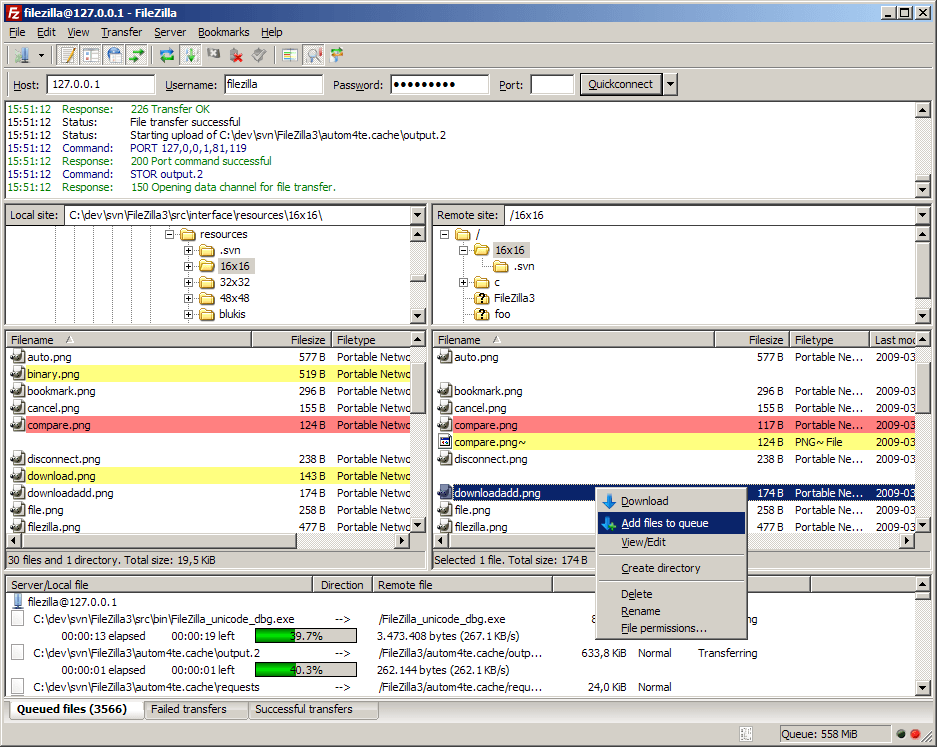
I mean, what the fuck is this horseshit?
......|..___________________, ,
....../ `---______----|]
...../==o;;;;;;;;______.:/
.....), ---.(_(__) /
....// (..) ), ----"
...//___//
..//___//
.//___//
WE TRUE HOMIES
WE RIDE TOGETHER
WE DIE TOGETHER
-
cyanide - Dat steatopygous
- Posts: 9197
- Joined: Sat Oct 11, 2003 6:09 am
- Location: US's toque
Re: laptop suggestions
by benji on Fri Sep 10, 2010 2:57 pm
Appears to be mainly identical in function, except one is clearly more organized
Yeah, uTorrent. Look at all that delicious info.
-
benji - Posts: 14545
- Joined: Sat Nov 16, 2002 9:09 am
Re: laptop suggestions
by shadowgrin on Fri Sep 10, 2010 3:04 pm
I have to remember and do a keyboard shortcut instead of instantly seeing the info I want?one is clearly more organized If I wanted the information that's showing on the tabs below for uTorrent, cmd-i brings up the same thing
- shadowgrin
- Doesn't negotiate with terrorists. NLSC's Jefferson Davis. The Questioneer
- Posts: 23229
- Joined: Thu Dec 12, 2002 6:21 am
- Location: In your mind
Re: laptop suggestions
by cyanide on Fri Sep 10, 2010 3:21 pm
benji wrote:First one doesn't make any sense from the picture how does it work? Second one looks nice, easy drag and drop interface with all information directly present.
I think you missed all those crazy scrollbars and ambiguous buttons.
You can drag and drop too. I guess I should add a couple more screenshots to show how it works. Progressive disclosure in action:

-195953-1.jpeg)
shadowgrin wrote:I have to remember and do a keyboard shortcut instead of instantly seeing the info I want?
80/20 rule bro, most of the info you want to see is already there. I never understood why you need additional info beyond that on a whim. You could right-click select or use the menu bar if remembering cmd-i is too hard.
......|..___________________, ,
....../ `---______----|]
...../==o;;;;;;;;______.:/
.....), ---.(_(__) /
....// (..) ), ----"
...//___//
..//___//
.//___//
WE TRUE HOMIES
WE RIDE TOGETHER
WE DIE TOGETHER
-
cyanide - Dat steatopygous
- Posts: 9197
- Joined: Sat Oct 11, 2003 6:09 am
- Location: US's toque
Re: laptop suggestions
by benji on Fri Sep 10, 2010 3:52 pm
How do those screens represent "progressive disclosure in action"? There's a window for entering FTP information, and then there's a window showing transfers I had to click to see? Or does it work like this: I get a window where I put in the server info, it connects, then changes the window to show me my files which I select, then shows me the server where I place them, then goes to the transfer window where I sit and watch the progress bars?
What's so amazing about that? Why would I want that over having Filezilla's EVERYTHING RIGHT THERE system? Where I can start selecting the next files in other folders to upload while keeping an eye on the transfers.
Those buttons aren't ambiguous, they tell you exactly what they do when you hover over them and for some that's turning off the different frames so you can reduce it all to just folder trees and then have to "progressively disclose" the transfer info.
I never understood why you need additional info beyond that on a whim. You could right-click select or use the menu bar if remembering cmd-i is too hard.
So because you can't see a "need" you just dismiss our "wants" and tell us to deal with it because we're objectively wrong?
Maybe I don't want to have to do additional commands, maybe I just want to look somewhere and see it right away.
Some of us don't want to have keep clicking next, we'd rather scrollwheel down to check all the options on an install (or better yet see it all right there in one window), we'd rather click a tab to see the files in a torrent instead of having to right click and select properties or something and then have a dialog box and have to deal with that. Some of us don't want to read your articles on twenty separate pages we want one giant article even if it "OVERWHELMS" US WITH LOTS OF TEXT, so on and so forth.
Essentially you're saying you prefer the software because of the way it appears. When you say "superior Mac versions" we expect you to mean that it has more features, can do more things, has some kind of special capability, not that its designed thinking we're idiots who can't handle being able to see all the information whenever we want without clicking or looks prettier.
Think about something like iTunes vs. Songbird vs. Amarok to manage your mp3s (not buy things) they all look more or less the same with slight differences. You can tweak the latter two to change their looks as well (with lots of people wanting them to look like iTunes) and this is all great and whatever. But when you start comparing the features? The flexibility? The potential for plugins and addons? iTunes is not by any means the "superior version" of music library software even if this icon is placed slightly more within the FOV of the average idiot user.
You can't change peoples minds by throwing around phrases and demanding they see why, then saying they're the problem for not understanding an academic concept. Now do you see my point about how subjective this is?
And even then, you're basically arguing one software is designed better than the other, fine, maybe Transmission is, and maybe this FTP is. There is nothing inherent to a Mac that prevents a third party from creating the same software design on a PC. As seen in Transmission where Linux is the lead and is designed exactly the same. So when you say "superior Mac software" and point to a single third party FTP program, that we've already explained why we don't think it is better, you can see why your whole argument that this "superior and free Mac software" made the AppleTax worth it was met with such a thud.
-
benji - Posts: 14545
- Joined: Sat Nov 16, 2002 9:09 am
Re: laptop suggestions
by shadowgrin on Fri Sep 10, 2010 4:30 pm
cyanide wrote:most of the info you want to see is already there. I never understood why you need additional info beyond that on a whim.
cyanide wrote:productivity
In a sense that it saves me time looking for those additional info.
- shadowgrin
- Doesn't negotiate with terrorists. NLSC's Jefferson Davis. The Questioneer
- Posts: 23229
- Joined: Thu Dec 12, 2002 6:21 am
- Location: In your mind
Re: laptop suggestions
by benji on Fri Sep 10, 2010 6:50 pm

-
benji - Posts: 14545
- Joined: Sat Nov 16, 2002 9:09 am
Re: laptop suggestions
by cyanide on Sat Sep 11, 2010 1:57 am
benji wrote:I still don't see how it works from those pictures. Where are you dragging and dropping from? Another window? What's so special about that? Because you can do that with filezilla and a ton of other FTP software as well. So much for the AppleTax benefits.
How do those screens represent "progressive disclosure in action"? There's a window for entering FTP information, and then there's a window showing transfers I had to click to see? Or does it work like this: I get a window where I put in the server info, it connects, then changes the window to show me my files which I select, then shows me the server where I place them, then goes to the transfer window where I sit and watch the progress bars?
Dragging and dropping files and folders between local and remote, like Filezilla. There's only one window the whole time. You have the connection screen where you can make a new server or connect to an already created server (why do you need to see the main ftp screen at this point when you have to connect first?). Once you hit connect, you move on to the main ftp screen (why do you need to view the connection screen when you're already connected to a server?), and if you want to see which files are/were transferred, hit the transfers button and all the information is organized there. Navigating anywhere is one click away. The application doesn't force you to do things you don't want it to do, like take you to to the transfers screen.
These are examples of progressive disclosure because all the features you want are there (power), except the primary information are presented to you first before the secondary (simplicity). Which leads me to my next point.
What's so amazing about that? Why would I want that over having Filezilla's EVERYTHING RIGHT THERE system? Where I can start selecting the next files in other folders to upload while keeping an eye on the transfers.
Those buttons aren't ambiguous, they tell you exactly what they do when you hover over them and for some that's turning off the different frames so you can reduce it all to just folder trees and then have to "progressively disclose" the transfer info.
The more features you add, the more power you have, but the more complex it becomes. Filezilla's "everything right there" system is an example of that, yet both applications have the same features. The only difference is that Flow hides those features when you're not using it so it can give you more screen estate to work with, while the accessibility to access those other features is still one click away. With that extra screen estate to work with the files or whatever it is you want to focus on, you have greater visibility (can see a larger area of the files/folders) and improved navigation (less scrolling). Filezilla is a nightmare when you have to scroll with that tiny nub.
"Keeping an eye on the transfers" is misleading in Filezilla. Say you transfer a large number of files. How do you keep an eye on them when you have to scroll with another tiny nub? Or still have to click on one of three tabs? At least Flow gives a badge number where you can really keep an eye on it. If you want to see the transfers in full detail, click a button and it'll give you a large screen area instead of a tiny section where it's a pain in the ass to find the information you want?
If you have to hover over the buttons to figure out what they do, then they're ambiguous. I can guarantee that a large number of users won't even know what these buttons mean without having to hover over them. And if you're trying to find a specific function, you have to hover over each until you find it. Since you mention that some of these buttons show and hide functions, doesn't that take away from your "everything is right there" argument?
So because you can't see a "need" you just dismiss our "wants" and tell us to deal with it because we're objectively wrong?
Maybe I don't want to have to do additional commands, maybe I just want to look somewhere and see it right away.
No. If you have wants, then there are options for advanced features for advanced users. The 80/20 rule (80% of the effects generated by any large system are caused by 20% of the variables in that system) applies to virtually every single application written, as well as in other large systems such as economics, management, quality control, and engineering. For example with Transmission, 80% of its most common user needs are shown while the other 20% are hidden. While you might want 100% of the features showing that remaining 20% could take up 200% more screen estate. You're sacrificing simplicity for more power, and users do want simplicity.
I don't mean to dismiss your wants because I do believe that all features should be accessible, but this is backed up with testing that users do not like complexity. Hence, the need to balance power and simplicity.
Some of us don't want to have keep clicking next, we'd rather scrollwheel down to check all the options on an install (or better yet see it all right there in one window), we'd rather click a tab to see the files in a torrent instead of having to right click and select properties or something and then have a dialog box and have to deal with that. Some of us don't want to read your articles on twenty separate pages we want one giant article even if it "OVERWHELMS" US WITH LOTS OF TEXT, so on and so forth.
I 100% agree with you. And that's the way it should be. You just listed Occam's Razor (when presented with two options with the same outcome, the simpler one is the better one). Some of us don't want to keep scrolling a tiny transfers bar in a tiny dialog box when you can click on one big button to view a large list of transfers. Some of us don't want a window where half of the screen estate is dedicated to features that are rarely used.
Essentially you're saying you prefer the software because of the way it appears. When you say "superior Mac versions" we expect you to mean that it has more features, can do more things, has some kind of special capability, not that its designed thinking we're idiots who can't handle being able to see all the information whenever we want without clicking or looks prettier.
I never once mentioned aesthetics. It's interesting you say "the way it appears" and "looks prettier" has some sort of significance. It does. Users like simplicity and users are more productive when information are organized and presented well. I admit "superior" is a bad choice of word since you're focusing on power. However, why does hiding advanced features automatically dismiss you as "idiots" when advanced features are rarely used? If they're not rarely used, they wouldn't be under advanced features.
You can't change peoples minds by throwing around phrases and demanding they see why, then saying they're the problem for not understanding an academic concept. Now do you see my point about how subjective this is?
I agree that having to balance simplicity and power is subjective as users have different demands as there are novice users and advanced users. There's always trade-offs between power and simplicity. I do this stuff for a living, and I know I'll never satisfy 100% of users, but usability testing shouldn't be dismissed because good design, with the goal of increasing efficiency and minimizing complexity and error, does affect how well people perform tasks.
......|..___________________, ,
....../ `---______----|]
...../==o;;;;;;;;______.:/
.....), ---.(_(__) /
....// (..) ), ----"
...//___//
..//___//
.//___//
WE TRUE HOMIES
WE RIDE TOGETHER
WE DIE TOGETHER
-
cyanide - Dat steatopygous
- Posts: 9197
- Joined: Sat Oct 11, 2003 6:09 am
- Location: US's toque
Who is online
Users browsing this forum: No registered users and 18 guests